


SM-A015A
SM-A015AZ
SM-A015F
SM-A015G
SM-A015M
SM-A015T
SM-A015T1
SM-A015U
SM-A015U1
SM-A015V
samsung remove frp android 11 bypass google account
samsung remove frp android 11 bypass google account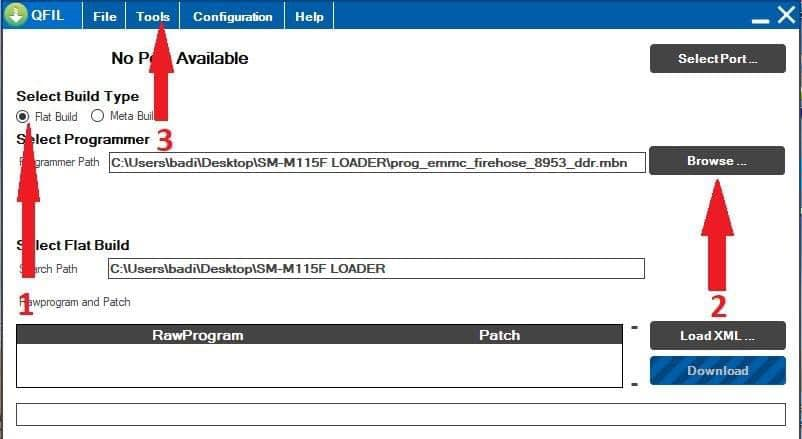
samsung remove frp android 11 bypass google account is an inbuilt data protection feature for all present-day Android smartphones, It protects phones from unauthorized access. After performing a factory reset, If you forget the last active Gmail account which was used on your phone, then, you have to find a solution to unlock your phone. Here, more especially, I shared a detailed process to Samsung Android 11 R FRP Bypass | Unlock Google Gmail lock Verification Latest 2021 Method Free (All Models) successfully. So, follow the below process carefully.
Google has added a security feature frp bypass Google Account (Factory Reset Protection) to its Android OS. This feature is important and is intended to avoid misuse of the device during thefts. But at the same time, some users have got into trouble because of it, when they have forgotten their GMAIL or password credentials after the hard reset. So, in this tutorial, we have brought the latest method to Bypass FRP Wiko View4 Lite google account unlock FRP Lock with PC by following some simple steps.
frp android 11 bypass google account Lest Model
- SM-A015A
- SM-A015AZ
- SM-A015F
- SM-A015G
- SM-A015M
- SM-A015T
- SM-A015T1
- SM-A015U
- SM-A015U1
- SM-A015V
- SM-A025F
- SM-A025G
- SM-A025H
- SM-A115F
- SM-A115M
- SM-A115U1
Google provides the new FRP feature on Android Lollipop, Marshmallow, Nougat, Pie, Oreo, 10 Q, and 11 versions. The summarization of factory reset protection is FRP and it basically protects Android users’ personal data and Privacy during thefts. The process of unlocking FRP security has different with every new Android version and phone. So, always remember the Gmail account information to avoid FRP protection lock.
The FRP turns On automatically when you have setup a Google Account on your Samsung Phone. After Reset your phone without removing the Google Account, you have to log in with the same Google ID and password that you set up earlier on the device to bypass Google account verification lock on your Samsung Android 11 R.
The method of work
1 Install Qualcomm EDL Mode drivers (find here)
2 Open the program ( qfil) Download
3After opening the program 0- Connect the phone with the computer in EDL mode via Test Point
1- We know on flat build
2-We put the appropriate loader for the phone to be deleted frp
To download the loader package from this site
3- From the Tools tab, choose partition manager
4- Then we click on the presistent file with the right mouse button and then click on partition manager data
5- In the same way, delete the config file
Tags:( Related searches on google )


